Wednesday, 5 December 2012

How to buy the best portable hard drive


You can never have too much digital storage, and the day will come—sooner than you think—when you won’t be able to squeeze a single new file onto your computer’s hard drive. And if your primary computer is a laptop or an all-in-one desktop, you won’t be able to solve the problem by opening the case and tossing in a supplemental drive.
One solution might be to rent storage space in the cloud, but buying a hard-drive’s worth of capacity is prohibitively expensive: 500GB of storage on Dropbox, for example, will set you back $499 per year. If you need just storage, as opposed to a service for file syncing or collaborating via the cloud, buying a portable hard drive is far more economical. For less than $200, you can get a 2TB drive that supplies four times the capacity of a Dropbox account. Pay for that storage capacity once, and you’ll own it forever—and you can take it with you wherever you go. Before you can choose the right drive, however, you have to identify your needs, wants, and budget.
Mac or PC: OS X and Windows use different file systems (HFS+ and NTFS, respectively), so most hard-drive manufacturers offer platform-specific models; the drives are preformatted accordingly, and the bundled software (if any) is compatible with the given platform. OS X can read files on an NTFS drive, but it can’t write them. If you intend to use the same drive on both platforms, you can install software on your Mac that will enable it to do both: NTFS-3G is a free option. If you prefer commercial software, take a look atParagon NTFS ($20) or Tuxera NTFS ($32).
Capacity: To determine how much storage you need, consider adopting this rule of thumb from drive manufacturer Western Digital: A 500GB hard drive can store approximately 100,000 digital photos taken with a 6-megapixel camera, or 125,000 songs encoded as 128-kbps MP3 files. Higher-resolution photos and music, of course, consume more storage.
Everything else being equal, a high-capacity drive will deliver a better price-to-performance ratio than a low-capacity model: For instance, a 500GB drive priced at $100 costs around 20 cents per gigabyte, while a 2TB drive priced at $180 costs just 9 cents per gigabyte. You won’t regret buying more storage capacity than you currently need, because you will surely need more later.
Rotational speed: The rate at which a hard drive spins its platters has a direct effect on how fast it can read and write data. A drive spinning at 7200 rpm will deliver much better performance than a drive spinning at 5400 rpm. Some high-end desktop drives spin their platters at 10,000 rpm.
The Buffalo MiniStation provides both USB 3.0 and Thunderbolt connections.
Drive interface: Once you’ve decided on the speed and capacity you need, you need to consider how the drive will connect to your computer. USB is the most common interface for Macs and PCs, and USB 3.0delivers a faster data rate than USB 2.0 (5 gbps versus 480 mbps) and more electrical power to an attached device (900mA versus 500mA). The newer standard is backward-compatible, so your computer will be able to use a USB 3.0 drive even if the computer has only USB 2.0 ports.


Thunderbolt ports are twice as fast as USB 3.0 ports, achieving a raw data transfer rate of 10 gbps. That’s speedy enough to transfer a full-length, high-definition movie in less than 30 seconds. Apple provides Thunderbolt ports on its most recent desktop and laptop computers, and the technology is beginning to show up on Windows machines, too. Thunderbolt hard drives are relatively expensive, however: At $180, Buffalo’s 500GB MiniStation HD-PA500TU3 portable drive costs nearly as much as a 2TB hard drive equipped with a USB 3.0 interface. Still, If you choose to buy one of Buffalo’s drives, you’ll be happy to know that the company includes a Thunderbolt cable in the box, given ho pricey these cables are: Apple’s 2-meter cable costs $49.
Plug this $100 adapter into any Seagate GoFlex drive, and you'll gain a fast Thunderbolt port.
FireWire (also known as IEEE 1394) is another high-speed interface used on both Macs and many PCs. The FireWire 400 interface can support a data transfer rate of 400 mbps, while the newer FireWire 800 interface can deliver throughput of 786 mbps.
USB, Thunderbolt, and FireWire all provide enough electrical power to run an attached drive, so the only cord you’ll need to carry with you is the appropriate interface cable.
Enclosure: The vast majority of portable hard drives are 2.5-inch mechanisms, but not all portable hard drives are the same size. Some models come housed in low-profile enclosures, while others are wrapped in shock-absorbing material within ruggedized cases. Such design decisions affect the drive’s overall weight, but they also influence how well the drive can survive misadventure. If you’re a frequent traveler who grudges every ounce that goes into your laptop bag, you’ll need to work out for yourself the right balance between data security and tolerable shoulder load.
This rugged Nomad case for Western Digital's Passport drives costs $20.
Some manufacturers, including Seagate and Western Digital, offer accessory cases for their drives that can add shock protection. We especially like the Nomad hard-shell case for Western Digital’s Passport drives. The amply padded, 6.25-ounce polycarbonate case has an opening for a USB cable, so you don’t have to remove the drive to use it.
Other features: In situations where performance is roughly equal, the easiest way for a hard drive manufacturer to differentiate its product from the competition's is by adding special features or by bundling the drive with useful software. If you’re interested in backing up your PCs, watch for drives that come bundled with automated backup software.
If you’re security conscious, look for a drive that you can password-protect or that includes software for encrypting the data stored on it. Some Seagate drives support the Universal Storage Module standard: They use SATA as their primary hardware interface, but you can switch to a USB, Thunderbolt, or FireWire interface by plugging in the appropriate module. Seagate is also unique in offering a portable drive that can wirelessly stream media to a mobile client device.

A few of our favorite portable hard drives

Buffalo MiniStation Thunderbolt
Buffalo MiniStation Thunderbolt: The MiniStation sports both a USB 3.0 and a Thunderbolt interface, but the drive’s rather pedestrian rotational speed of 5400 rpm hobbles its overall performance. It comes preformatted for the Mac, and both USB 3.0 and Thunderbolt cables are included.
Click here to read Macworld's complete hands-on review of the 1TB model in a Mac environment.
Rocstor Lancer LX
Rocstor Lancer LX: If you’re looking for a ruggedized drive with a very fast interface, Rocstor’s Lancer LX provides both USB 3.0 and two FireWire 800 ports. The border of the enclosure is fabricated from aluminum and can bear a fair amount of weight, while shock-absorbing material inside the case protects the drive from thumps and bumps.
Click here to read our detailed review of the 500GB model in a PC environment.
Seagate Satellite
Seagate Satellite: This battery-powered drive can create its own local hotspot, and stream audio and video to up to eight wireless clients. Seagate provides client software for Android and iOS devices, plus an NTFS driver for the Mac. It uses a USB 3.0 interface.
Click here to read our full review of the 500GB drive in a PC environment.
Seagate Slim
Seagate Slim: The 9mm-thin Seagate Slim is appropriately named. It leaves the factory with a USB 3.0 interface, but since it’s based on the Universal Storage Module standard, you can purchase an optional Thunderbolt interface for $100 (you’ll need to provide your own cable). It comes formatted for NTSF, but Seagate provides an NTFS driver for the Mac. On the downside, this model delivers only 500GB of capacity.
Click here for our hands-on review of the Slim in a PC environment.
Western Digital My Passport
Western Digital My Passport: For people who need a lot of storage on the go, this drive packs up to 2TB of space into a package that weighs just 8 ounces. It comes with a USB 3.0 interface and a collection of utilities—including automatic back-up software—for both the Mac and the PC.

HP brings tablet functionality to new EliteBook Revolve


Hewlett-Packard is bringing a twist to its business laptop design with the new EliteBook Revolve, which is the company's first Windows 8 touchscreen laptop that can double up as a tablet in some circumstances.
The Revolve has an 11.6-inch display that can swivel and be placed on the keyboard to turn the laptop into a tablet. The screen displays images at a 1366-by-768 pixel resolution.
The laptop has a classic convertible design, but is thin and has more of a tablet feel when used in that mode. But at 1.36 kilograms, the laptop is heavier than pure tablets, which generally weigh under a kilogram.
The laptop has 256GB of SSD (solid-state drive) storage. Chip options are Intel's Core i3, i5 or i7 processors based on the Ivy Bridge microarchitecture.
This is the first Windows 8 touchscreen laptop for commercial customers offered by HP, said Ajay Gupta, director of commercial notebook products.
"We expect the battery to be close to 10 hours, but it hasn't been finalized," Gupta said.
HP is expanding its lineup of touchscreen products with Windows 8 for businesses. Earlier this year, the company announced the ElitePad 900 tablet, which will ship in January.
Many hybrid designs come with detachable screens that can function independently as tablets. But with the EliteBook Revolve, HP is keeping the screen permanently attached to the base.
"We wanted to provide the full Core CPU functionality," Gupta said.
Having a base helps Revolve pack in more components to meet the performance, power consumption and cooling requirements of the speedy Core CPU, Gupta said.
It is possible to fit the Core CPU in the thin tablet design, but the processor would need to be throttled "very, very aggressively," Gupta said.
The Core CPU typically needs a cooling fan when running at normal clock speeds, while tablets with low-power processors don't require fans. Examples include tablets using ARM processors and HP's own ElitePad 900, with Intel's slower Atom processor code-named Clover Trail, which is optimized for tablets.
EliteBook Revolve meets the specific performance requirement of business customers, Gupta said, dispelling the notion that the company is putting out new laptop designs to see which one sticks.
"The usability, the feel we wanted in people's hands and the performance we wanted to deliver, this was really the most elegant way of delivering that," Gupta said.
The laptop has two USB 3.0 ports and a DisplayPort monitor outlet. The base memory is 4GB that can be extended to 12GB. The laptop has a BIOS optimized for Windows 8, but in some cases customers have the option to preload Windows 7.
Mobile broadband options include LTE in the U.S. and HSPA+ for the rest of the world. The laptop has multiple short-range wireless connectivity options including NFC (near-field communication) and Bluetooth.
The Revolve will be available worldwide in March and pricing will be announced at the time of release, HP said.

Nokia launches Lumia 620, a budget-based Windows Phone 8


Nokia has announced the Lumia 620, its most affordable Windows Phone 8 device yet. With an estimated pricing of $250 contract-free, the Lumia 620 is the company’s budget Windows Phone 8 smartphone, although for just $50 more you might have better options.
The specs on the Lumia 620 are in line for a budget phone: it has a 3.8-inch display with 800-by-480 pixel resolution, a 1GHz Qualcomm Snapdragon dual-core processor. It has 512MB of RAM and 8GB of built-in storage (expandable up to 64GB via MicroSD), and 7GB free Microsoft SkyDrive storage.
Nokia said the 5-megapixel camera with flash on the Lumia 620 shares the same lenses with the higher-end Lumia 920 and 820. Meanwhile, the front-facing camera is a standard VGA sensor, and this phone also has NFC connectivity on board for accessories such as portable speakers and payment apps.
As with most Windows phones, the Lumia 620 comes in a range of colors, including lime green, orange, magenta, yellow, cyan, white and black. Nokia used a new dual-shot color technique that adds a second layer of colored, transparent or translucent polycarbonate on top of a base layer to produce secondary color blends and depth effects.
The Lumia 620 is estimated to cost $250 unlocked and contract-free. It will begin selling in January 2013 in Asia, followed closely by Europe and the Middle East before expanding further.
Although at $250 the Lumia 620 is the cheapest Windows Phone 8 by far, if you have $50 extra, you could get a higher-end phone, unlocked. The Google Nexus 4 is $300 contract free, has a larger 4.7-inch high-resolution screen, a better camera at 8MP, 2GB of RAM and a quad-core processor – so unless you want a Windows Phone 8 specifically, the Nexus 4 is a better option for a just that extra $50.

Review: iTunes 11 adds cool features, but can be jarring to longtime users


iTunes 11, whose delayed release fueled much speculation about last-minute changes following an internal reorganization at Apple, sports the most radical alterations to the program’s interface since its inception. Previous upgrades to iTunes were incremental, adding features and tweaking the interface, but iTunes 11 puts a whole new face on the software. In addition, iTunes 11 seems to be designed more for playing music than for organizing it—a slightly anachronistic approach, given the prevalence of portable devices.
The most obvious change is the reintroduction of color to the program. In my review "First look: iTunes 10," written in September 2010, I lamented the absence of color, saying, “iTunes 10 has a somewhat Soviet utilitarian look which, to my eyes, makes it less interesting to work with.” Well, color is back, both in the sidebar and in the Library pop-up menu at the top left of the iTunes window. In addition, when you display playlists, their text will be larger and bolder, and the background of the Playlists column will be lighter, providing much better contrast. The program also uses a Helvetica font with reduced spacing between letters, enabling iTunes to display longer texts in short spaces (such as in the Playlists column).

Viewing your music

The new options to view music by Genres or by Artists display sidebars showing icons for genres or for artists, with icons from your album art. (Videos, Books, and other types of content offer similar options.) You can sort items in these views as you like: Press Command-J to display a tiny View Options window, where you can sort by Title, Artist, Year, or Rating, for example, when in Genres view.
Apple removed some views from iTunes, but it increased the number of view options. In each view mode—Songs, Albums, Artists, or Genres—you have sort options, but if you click Playlists, and then select a playlist, the View button near the top right of the iTunes window gives you even more options. Although I regret the loss of Album List view, I’m quite happy with some of the new options.
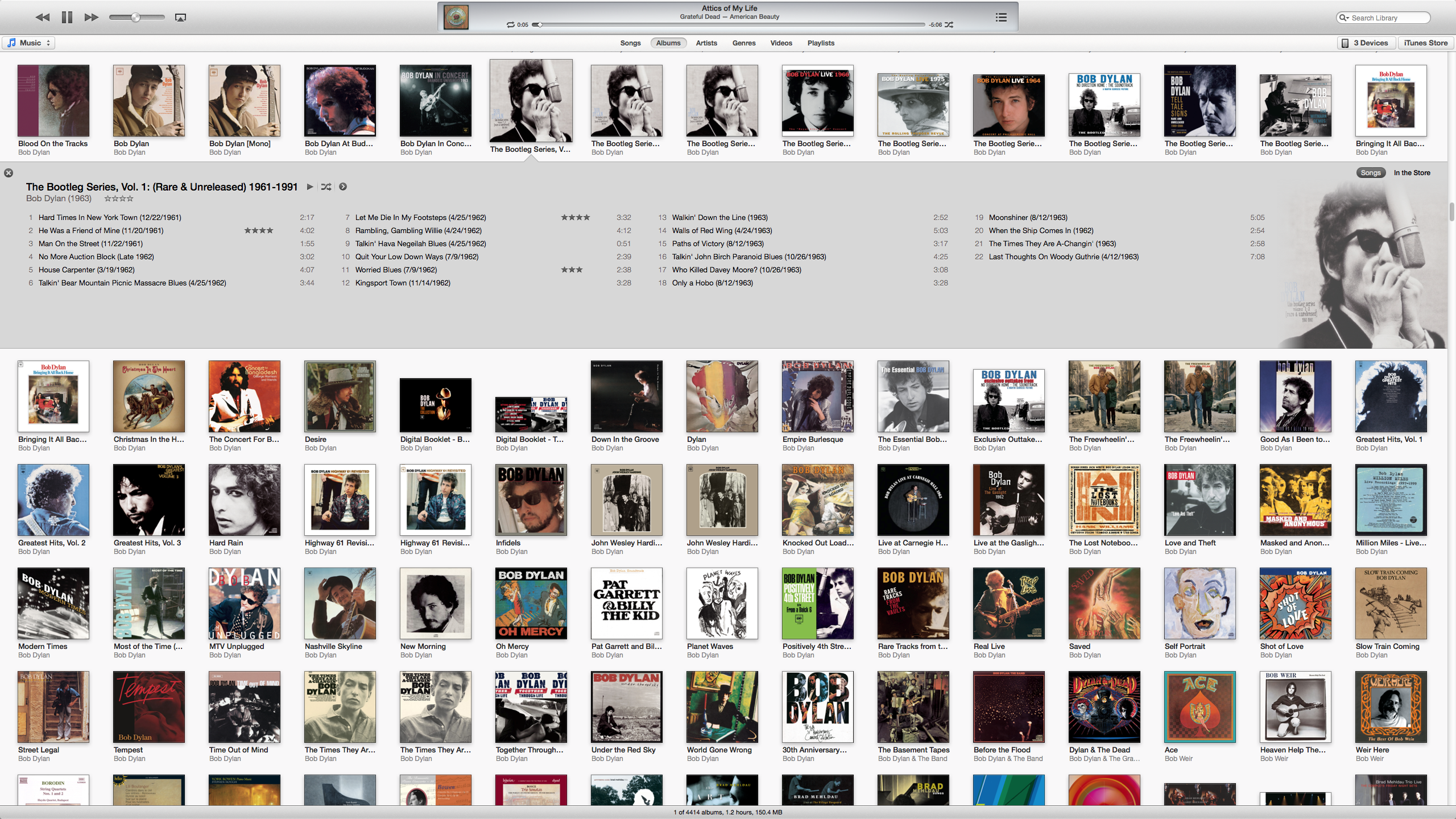
In Albums view—the new default view—everything is an album; that is, whether the actual content is a single song, a few songs from an album, or an entire album, a single graphic represents it. The only way to determine how many tracks are collected there is to click the graphic. This design choice is surprising, as younger music fans tend to focus on individual songs rather than on albums.
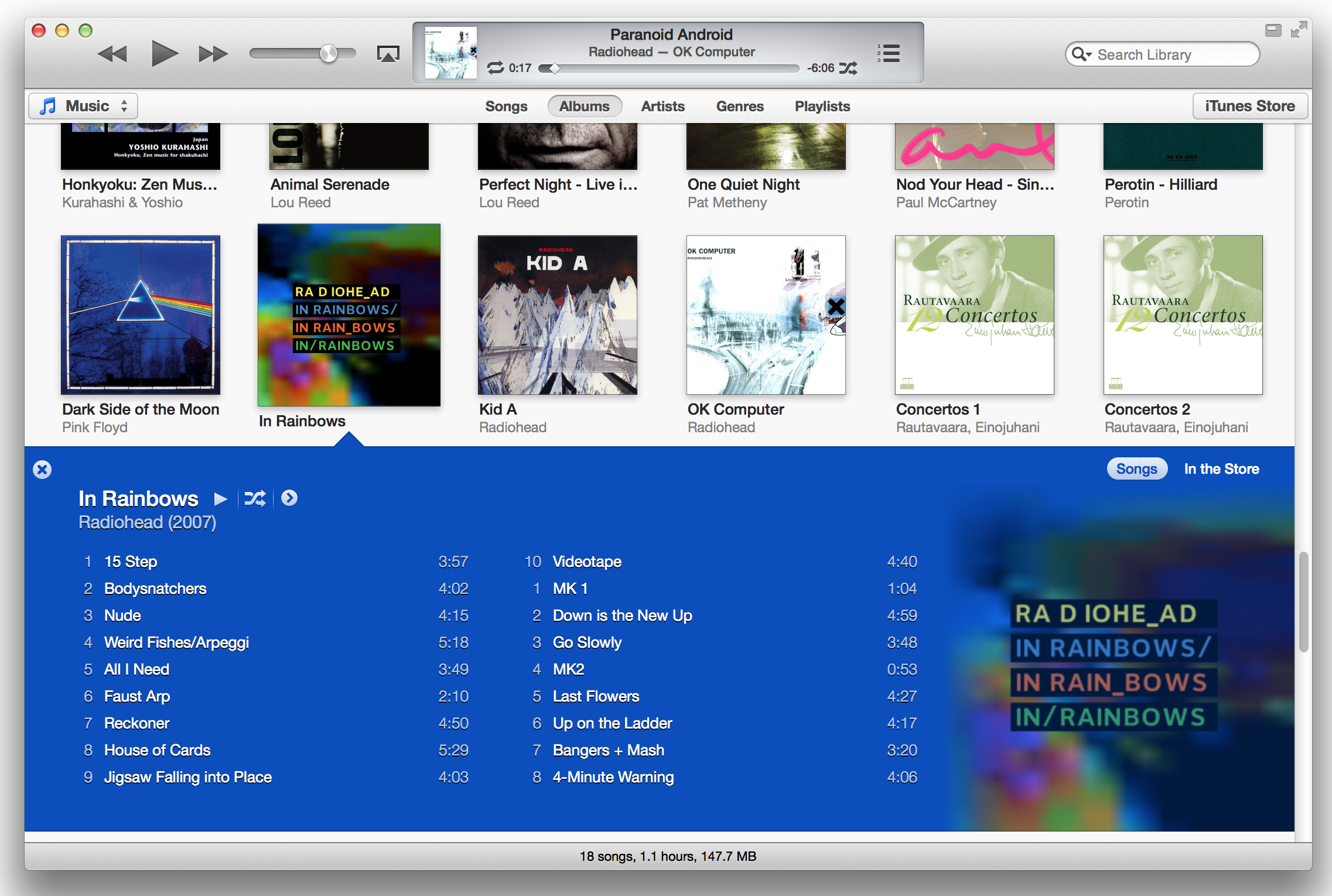
When you're in Albums view, you can click a graphic to see what’s behind it. The expanded view shows the tracks in several columns (if there are enough tracks), with the album artwork to the right. The background and text take on colors from the album art. (To turn off the expanded view’s colors and album art display in the General preferences, uncheck Use custom colors for open albums, movies, etc.)
In its expanded view, iTunes 11 focuses on a single album, showing its tracks in columns and its artwork to the right, and using dominant colors from the album art for the background and text.
The limited information shown in Albums view can make it harder to choose what you want to play. Imagine that you have an album containing several songs you like, but you can’t remember which ones. If you haven’t rated them, there’s no way to identify your favorites. In previous versions of iTunes, you could see information such as play counts and last-played dates, but in iTunes 11 you can't. So if you don’t remember the song you liked so much on a particular Radiohead album, say, you won’t be able to find it quickly. You can get the information in Songs view, but that view is sterile and uninviting, with no album art and no clear separation between albums.
Also in Albums view, iTunes groups compilation albums at the bottom of the list. This leads to two problems. First, nothing tells you that the compilations are compilations; as there are no letters to give you milestones in the album list—such as A, B, or C, for artists’ names—you don’t known where the compilations section starts (and it’s hard to tell where a particular artist is at a glance). Second, the artist listed below the title of a compilation is the artist of the first track of the album; identifying the performer as “Various Artists” would have been more helpful.
You can’t change the size of the icons in Albums view, most likely because of the new track display in the expanded view. The fixed icon size limits the way you view your content, and the very wide display of tracks is neither very practical nor economical, at least on a large display. On my 27-inch Cinema Display, 15 albums string across the screen in Albums view, and as many as four columns for track names in expanded view, which looks odd to me; when I make the window smaller, as on a laptop, the two or three columns that display are much more readable. Another drawback: The small icons truncate titles that are longer than about 20 characters.
On a 27-inch display, the iTunes window is too big for the size of the album icons.
Other elements of iTunes 11 suggest that it was designed for small displays. If you don’t show the sidebar, the buttons for accessing different features are very far apart. On the left, a pop-up menu lets you choose which library to view. But to access your devices—iPhones, iPods, and iPads—or to go to the iTunes Store, you have to move your mouse all the way to the other side of the screen. Clicking the button to activate the Mini Player involves the same long-distance mouse travel, though there’s a keyboard shortcut for that: Command-Option-3.
By default, the entire iTunes window displays your content in what was previously called Grid View. The sidebar is hidden, though you can display it by pressing Command-Option-S or by choosing View > Show Sidebar. List View, which you can access it by clicking List in the header bar, is still available for content other than Music; but Cover Flow and Album List views are gone. In the Music library, this is called Songs view.
Classical music fans are out of luck with iTunes 11. The only way to view your music by Composer is to use the hard-to-navigate Songs view. Neither the Artists nor the Genres view provides a Composers column; and the Column Browser, which could simplify matters, is available only in Songs view.

Playlists

You can view playlists in a new way. Click Playlists in the header (the sidebar must be hidden for this option to be available), and you'll see a sidebar that displays only playlists. A pop-up menu above the list offers access to your different libraries—Music, Movies, TV Shows, and so on. Another pop-up menu, this one at the right side of the iTunes window, provides access to your iOS devices.
With the new Playlists view also comes a new way of creating playlists. Click the Add To button at the right of the iTunes window to show a two- or three-pane display. On the left are Songs or Albums in a single pane, or Artists and Genres with a list to the left and content in the middle. Your playlist is on the right; you can drag items to it, and click Done when you’ve finished.
The new way of creating playlists in iTunes 11 simplifies this task.
Curiously, if you have the sidebar displayed, you don’t see the Add To button when you click a playlist, and you have to manually drag items to the playlist. This surprising situation is one of the many inconsistencies in iTunes 11, where controls appear and disappear according to what you are viewing and how.
All of these view options are essentially the same for other types of content. I’ve focused on music here, but movies, TV shows, books, and so on, inherit the same 

Microsoft Surface Pro has half the battery life of Surface RT


The Surface Pro tablet with Windows 8 from Microsoft has only half of the battery life of the less expensive Surface with Windows RT, and less than the average battery life of Ultrabooks too.
Microsoft announced on Thursday that pricing of the Surface Pro will start at $899 for the 64 GB storage model and $999 for the 128 GB version, which includes a digitizer pen, although not a keyboard cover. The tablet is scheduled to go on sale in January, but Microsoft did not give an exact date.
The Surface with Windows RT (starting at $499 for 32GB model) and the forthcoming Surface with Windows 8 Pro have several other key differences. The Windows 8 Pro Surface is thicker and heavier, and runs on an Intel Core i5 processor with 4GB of RAM. It also has a higher-resolution 10.6-inch screen at 1920 by 1080 pixels.
The Intel chip is needed because the Surface Pro can run regular Windows software in Desktop mode, such as Photoshop or Firefox. The Surface RT is limited to Microsoft Office in Desktop mode and Windows Store apps.
That power-hungry processor provides another difference between the two tablets, which Microsoft revealed via its Twitter account.The better-equipped Surface Pro has only half the battery life of its sibling—meaning you would get around four and a half hours on a charge at most. This is despite the fact that the Windows 8 Pro Surface keeps connectivity off when hibernating to preserve battery, so it’s not an always-connected tablet.Considered as a tablet, the Surface Pro costs more than a high-end tablet, and has half the battery life. Perhaps it's better to compare it with ultrabooks, which are more in the price and power range. But even in this case the Surface Pro falls a bit short of its rivals. In PCWorld’s tests, ultrabooks from Vizio, Asus, Acer and Dell have consistently passed five hours of battery life, with some going toward a six-hour average—around an hour more than the Surface Pro.

Zensorium launches Tinké cardiorespiratory health and stress monitor for iOS devices (video)

Zensorium launches Tinké cardiorespiratory health and stress monitor for iOS devices (video)
Planning a gluttonous holiday season and then a health kick in the New Year to balance it out? Well, when you start on the latter, you might want one of Zensorium's Tinké cardiorespiratory monitors to track your progress. The sensor is compatible with any of your old-fashioned 30-pin iOS devices (it'll work with the Lightning adapter, too), and with the press of a thumb, it can measure heart rate, blood oxygenation and respiratory rate using light. All this data is fed into the free companion app, which generates an overall fitness score called the "Vita Index" and logs it for later comparison. Stress levels can also be assessed, using fluctuations in your heart rate to score the "Zen Index." Sharing how unfit and stressed you are can be done via Facebook or Tinké's own network, which also allows you to compare results with other users worldwide. The monitor will set you back $119 and is available now from Zensorium (link below) in a choice of four colors. If you'd like to start improving your Zen Index right now, then check out the soothing acoustic sounds in the product walkthrough video below the fold.

ASUS Zenbook Prime review (UX51Vz): a blazing 15-inch Ultrabook with a lofty price

Windows 8 has ushered in an era of category-defying devices, with hybrid machines that bend, flip around, lie flat and otherwise contort flooding the market (and our offices). When virtually every Windows 8 product we've reviewed possesses acrobatic abilities, it's easy to forget regular ol' laptops are running Microsoft's new OS, too. One such machine is the $1,949 ASUS Zenbook UX51Vz (aka the U500), a 15-inch Ultrabook with the trappings of a multimedia powerhouse, including a quad-core Core i7 processor, NVIDIA GT650M graphics and a 1080p IPS display -- and no gymnastic tricks up its sleeve. Another thing it doesn't have: a touchscreen, which is available on plenty of other Windows 8 notebooks, not to mention other upcoming Zenbook Prime models. Considering that (possibly glaring) omission, is the UX51Vz still an attractive option at this premium price point? Head past the break to find out.

Tuesday, 26 June 2012

Apple opens iTunes Store in Hong Kong, Taiwan and 10 other Asia-Pacific territories


Many Apple fans on the opposite side of the Pacific from Cupertino haven't had much of a choice to shop from iTunes, even though they've had the App Store for some time. There's now a much better sense of balance: Apple just flicked the switch on the iTunes Store for music and movies in a dozen countries and territories across the Asia-Pacific region. The company singles out our own Richard Lai's Hong Kong as well as Singapore and Taiwan, but we'd be remiss if we didn't mention that Brunei, Cambodia, Laos, Macau, Malaysia, the Philippines, Sri Lanka, Thailand and Vietnam are also getting the media catalogs, which include local content along with the international hits. It's a full catch-up as well, with iTunes in the Cloud re-downloads and iTunes Match subscriptions available in every new country. If you're a huge Andy Lau fan but wanted his albums from the most iPhone-friendly store possible, the wait is over.

Wednesday, 29 February 2012

Apple iPad 3 expected on 7 March following press event


Apple has announced an event on 7 March at which the company is expected to launch its latest iPad tablet.
Invitations sent to journalists read: "We have something you really have to see. And touch." While not officially confirming the product's launch, the message was accompanied by an image showing what looked to be an iPad touchscreen.The iPad range, which first launched in 2010, has sold more than 50 million units worldwide.
It is not yet known when the new device will be available for sale. Last year, sales of the iPad 2 began in the US nine days after the launch announcement - which also took place in March.
Apple's first two versions of the iPad transformed the market for tablet computers and made it one of the fastest-growing sectors of the computer industry.
Patent woes
However, recently Apple's dominant position in the tablet market has been challenged by a string of tablets powered by Google's Android operating system.
Later this year, industry experts expect a new category of tablet devices powered by Microsoft's forthcoming Windows 8 operating system.
Microsoft will announce details for the consumer versions of Windows 8 at an event in Barcelona on Wednesday evening.
The tablet market - just like the smartphone market - has been subject to intense patent wars, chiefly between Apple and its key challenger Samsung.

Thursday, 19 January 2012

Apple announces free iBooks Author app for OS X for publishing books to the App Store

We're here at Apple's education-themed event at the Guggenheim museum in New York City, and the company's just introduced iBooks Author, a free OS X program for producing books including -- yes -- educational texts. The real story here is ease of use, with the ability to drag and drop photos, videos and even Microsoft Word files into various templates. If you use Apple's own suite of office apps, in particular, you can drag and drop a Keynote presentation into the doc, and it'll live on as an interactive widget. (You can whip up other widgets, too, though you'll need to know Javascript or HTML.) Moving beyond the main text, authors can also arrange glossaries by highlighting words, clicking and then clicking again to add a definition. In a surprise move, Apple also said authors can publish straight to the store, though we're waiting for clarification that textbook writers and other scribes are actually exempt from Cupertino's notorious App Store approval process. In any case, the app is available today, for free, in the App Store, so by all means, get cracking on that sci-fi glossary you never knew you wanted.

Saturday, 3 December 2011

Apple's request to block Samsung Galaxy tablet, phone sales in the US is denied

As the legal drama between Apple and Samsung drags on around the world, US District Court Judge has rejected Apple's request to block the sales of Galaxy devices. Reuters reports the ruling came out late Friday, with the judge deciding "It is not clear that an injunction on Samsung's accused devices would prevent Apple from being irreparably harmed,". This isn't the first rejection for the folks from Cupertino either, after a request to speed up the trial was also denied back in July. The case itself will of course go on, but this means you'll still be able to get your hands on those Galaxy Tabs, Galaxy S IIs, and the like in the meantime.

Update: While Apple has yet to comment on the ruling, Samsung has issued an official statement which you can check out after the break. 
Samsung:
Samsung welcomes today's ruling denying Apple's request for a preliminary injunction. This ruling confirms our long-held view that Apple's arguments lack merit. In particular, the court has recognized that Samsung has raised substantial questions about the validity of certain Apple design patents. We are confident that we can demonstrate the distinctiveness of Samsung's mobile devices when the case goes to trial next year. We will continue to assert our intellectual property rights and defend against Apple's claims to ensure our continued ability to provide innovative mobile products to consumers.

Syria 'bans iPhones' over protest footage

Syria has banned the iPhone, reports say, as the government tries to control information getting out of the country.
In a statement apparently issued by the customs department of the Syrian finance ministry and seen by Lebanese and German media, the authorities "warn anyone against using the iPhone in Syria".The order also apparently prohibits the import of iPhones. The UN believes 4,000 people have been killed in Syria since March.
Most international media have been banned from Syria since the uprising began, so footage of the violent crackdown has primarily come from activists filming material themselves and posting it on the internet.If the document posted on the Lebanese news website el-Nashra is genuine, the authorities threaten confiscation and prosecution for anyone found with an iPhone.
Syrian opposition sources in Beirut confirmed the ban to the German Press Agency (DPA).Other types of smartphones are apparently not affected by the ban.

YouTube's website redesign puts the focus on channels


YouTube has revamped its website putting channels at the core of the service.
A channel is a curated list of video clips chosen by a specific YouTube member or celebrity.
Channels are now displayed in a central column on the site's home page resembling news feeds on social networks such as Facebook or Google+.
Experts say the redesign may mean people spend longer on the site, but some users have attacked the change.Complaints
Around 17 hours after an official "Get More Into YouTube" clip explaining the move went live, 6,703 members had clicked the "dislike" button compared to 2,280 who had clicked "like".
"The layout is a mess! Why can't I remove vids which I've already watched?" wrote one member.
Others wrote "R.I.P. Youtube" and "Change it back", although some complimented the change.
The site's owner, Google, has posted a blog saying that the new design was "focused on helping you discover a broader range of entertainment", but said there might be "further tweaks" depending on members' feedback.
It highlighted the fact that the site now offered deeper integration with Google+ and Facebook, helping members see what their friends were sharing without leaving YouTube's site.
Channels from broadcasters, including the BBC and Channel 4, are also promoted.
Google is also in the process of launching around 100 channels curated by celebrities and other well-known content providers. The firm is investing tens of millions of dollars into the project.
Reports suggest the singers Madonna and Jay-Z, the actor Ashton Kutcher, the creator of the CSI TV shows Antony Zuiker, and the skateboard legend Tony Hawk will be among those providing content.
The majority of the new channels are expected to launch next year.
Google said the site already attracts over 3 billion clip views per day.
Yearning
Company watchers believe the revamp will help make the site more "sticky".
"This does the obvious thing of keeping people longer on their site," said Theresa Wise, an independent media analyst.
"But it is also taking the behaviour we've seen of people going to sites such as Facebook and Twitter to see what videos are trending, and allows them to do it easily from within YouTube itself."
Analysts also believe the backlash will be short-lived, noting similar reactions after refreshes by other sites.
"The trouble with the kind of instant reaction is that most of the people who post their comments are those with extreme reactions, and their yearning for the old design will probably dissipate as they get used to it," said Ian Maude, internet analyst at Enders Analysis.
"But I like it - it feels fresher and more up to date and the shift to channels helps YouTube move towards professional programming to create a more TV like service.
"That makes it a more attractive environment for both content providers and advertisers."

Monday, 7 November 2011

Smartphone scams: Owners warned over malware apps

A national computer security campaign is urging smartphone users to do more to protect themselves from unwittingly downloading malware applications.
Get Safe Online says that there has been an increase in smartphone malware as the market has grown.
Criminals are typically creating Trojan copies of reputable apps and tricking users into installing them.
Once on the phone, the app can secretly generate cash for criminals through premium rate text messages.
Get Safe Online, a joint initiative between the government, police and industry, said it was concerned that users of smartphones, such as Android devices, were not taking steps to protect their devices.
Get Safe Online said fraudsters are designing apps which generate cash secretly in the background without the owner realising until their monthly bill.
A typical scam involves an app designed to send texts to premium rate services without the user knowing.Apps can appear to be bona fide software or sometimes masquerade as stripped down free versions of well-known games.
Rik Ferguson, a hacking researcher with internet security firm Trend Micro, said: "This type of malware is capable of sending a steady stream of text messages to premium rate numbers - in some instances we've seen one being sent every minute.
"With costs of up to £6 per message, this can be extremely lucrative. The user won't know this is taking place, even if they happen to be using the device at the same time, as the activity takes place within the device's back-end infrastructure."
Online banking
Another major security firm, Symantec, recently warned in its annual threat assessment that Android phones were at risk and that it had found at least six varieties of malicious software.
Minister for Cyber Security Francis Maude said: "More and more people are using their smartphone to transmit personal and financial information over the internet, whether it's for online banking, shopping or social networking.
"Research from Get Safe Online shows that 17% of smartphone users now use their phone for money matters and this doesn't escape the notice of criminals."
Tony Neate, head of Get Safe Online, urged people to check their phone's security.
"Mobile phones are very personal. I have talked to people who are never more than a yard away from their mobile phone. Because of that attachment, they start to think that they are in a way invincible.
"It's the end user that picks up the tab - it's your phone that incurs the costs. Whether you have pay-as-you-go or a monthly account, that money is going to come from the account and go to the criminal."

Adidas websites go offline after hacking cyber-attack

Adidas has taken its website content offline after suffering what it described as a "sophisticated, criminal cyber-attack".
The German sportswear maker said it had no evidence that its consumers' data had been impacted, but that it was taking down the affected sites to protect visitors.
The news follows a series of attacks against Sony earlier in the year.
Millions of users details were compromised.
A statement from Adidas said that it discovered the incident on 3 November.
The firm said it had since put in place additional data security measures and had started to relaunch its websites.
"Nothing is more important to us than the privacy and security of our consumers' personal data," the statement added.
"We appreciate your understanding and patience during this time".
The news comes less than a week after internet security experts reported that 29 chemicals firms had been targeted by a series of cyber-attacks.
Data was also stolen from Sony's PlayStation Network in April, compromising around 77 million gamers' personal details.
The firm's Sony Pictures website and Sony Music pages were targeted by subsequent attacks, prompting several apologies.